Why Shopware and Microsoft Dynamics Are B2B Power Duo
The connection between Shopware Microsoft Dynamics represents far more than just a technical necessity in the modern e-commerce landscape. For many companies in the German-speaking region (DACH—Germany, Austria, Switzerland), this integration forms the backbone of their digital commerce strategy. Yet while most agencies and integration partners focus on simply moving data from A to B—synchronizing inventory and importing orders—the true potential of this powerful combination often remains untapped.
In an era where Artificial Intelligence (AI) is revolutionizing commerce, it's no longer sufficient for your systems to merely "talk to each other." They need to "think together." This is where AI product consultation comes into play, transforming passive data exchange into active sales conversations.
This comprehensive guide illuminates not only the technical foundations of the interface between Shopware 6 and Microsoft Dynamics 365 (particularly Business Central and Finance & Operations) but also shows you the path to the third level of integration: How to leverage your ERP data to realize automated, high-quality product consultation through AI that actively increases your revenue.
The Role Distribution: Logic Meets Experience
Before we dive into the depths of AI-powered architecture, we must understand why this combination dominates among German mid-sized businesses. According to Microsoft, the integration between these platforms enables seamless business process automation.
- Microsoft Dynamics 365 (Business Central / NAV): Serves as the "brain" of your operational processes. This is where the truth about inventory levels, complex B2B pricing, bills of materials, and logistics processes resides. It's designed for stability and logic.
- Shopware 6: Is the "face" to the customer. As an API-first platform, it offers the flexibility to create emotional shopping experiences that are increasingly expected in the B2B sector (consumerization of B2B).
The Must-Haves of Standard Integration
Every functioning Shopware Microsoft Dynamics integration must cover the following basic functions to ensure operational efficiency, as documented by integration providers like Codeless Platforms and Folio3:
- Product Master Data: Synchronization of title, description, weight, and variants.
- Inventory Levels: Real-time matching to prevent overselling.
- Pricing: Transfer of customer-specific price lists and tiered discounts (Tier Prices).
- Order Import: Automated creation of webshop orders in the ERP as sales orders.
- Status Updates: Feedback of shipping status and tracking codes to the shop.
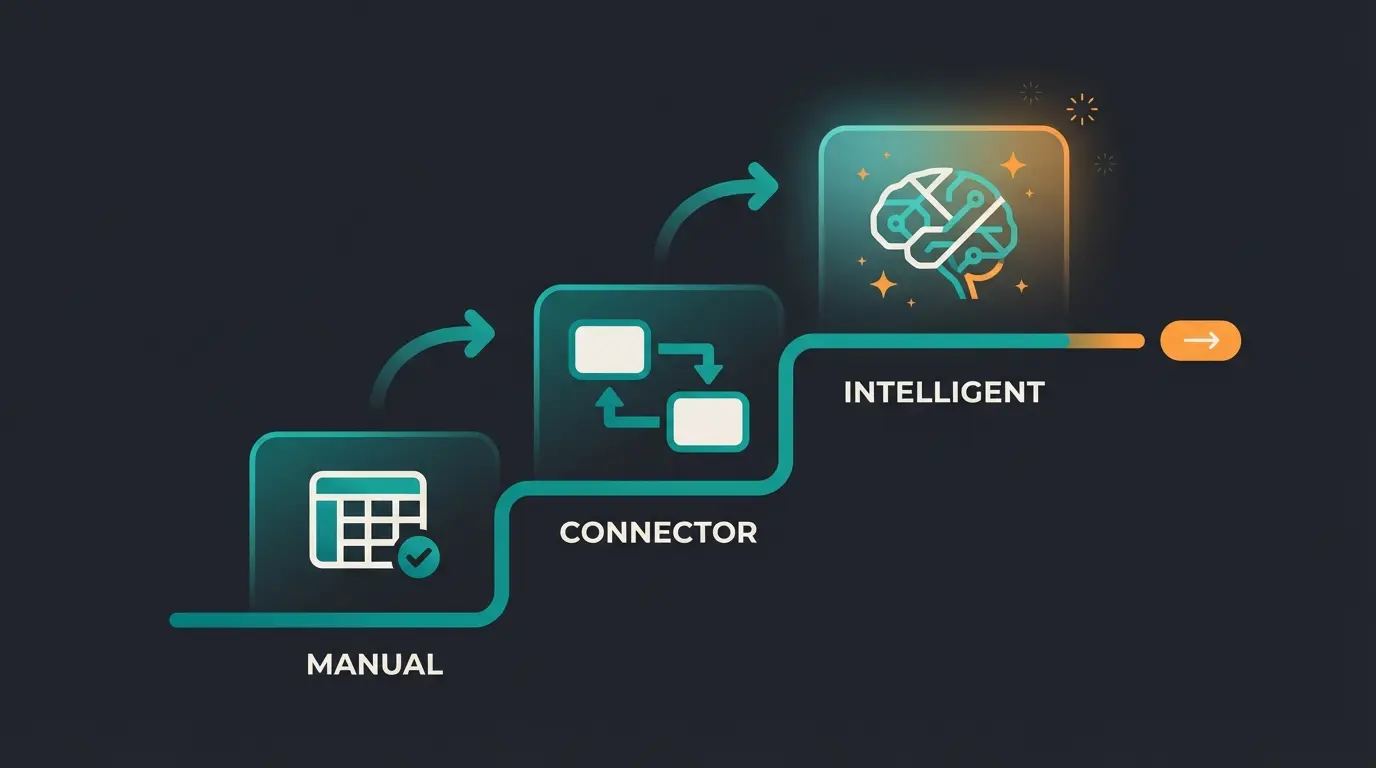
The 3 Levels of Dynamics & Shopware Integration
To understand where you stand and where you need to go, it helps to categorize integration into three maturity levels. This framework will help you assess your current state and plan your Shopware automation in 2025 journey effectively.
Level 1: The Manual Trap (CSV & Excel)
Many companies start here. Data is manually exported, processed in Excel, and imported into Shopware via CSV files.
- The Problem: Data is already outdated the moment it's uploaded. Error susceptibility is extremely high.
- Conclusion: No longer sustainable for professional B2B commerce today.
Level 2: The Connector (The Current Standard)
This is the status quo of most professional setups. Middleware solutions or direct plugins (such as those from Tinx-IT, Folio3, or proprietary agency solutions) ensure automated data exchange.
How it works: A customer adds Item A to their cart. The connector checks in Dynamics in the background: "Is the item available?" and "What is the price for Customer X?"
Limitation: The data is used passively. It's displayed but not interpreted. The shop doesn't "know" that Item A actually requires Accessory B, unless this was manually maintained as cross-selling. This is where Shopware API automation capabilities become crucial for bridging the gap.
Level 3: The Intelligent Layer (Your Competitive Edge)
Here we transform the integration from a data pipeline to a sales assistant. Instead of merely mirroring data, we use the depth of information in Microsoft Dynamics (technical attributes, historical sales data, return reasons) to feed an AI that actively advises customers in the Shopware frontend. This is how AI-powered sales consultants create real competitive advantage.
CSV exports, Excel processing, high error rates, outdated data
Real-time sync via connectors, passive data display, limited intelligence
AI-powered consultation, predictive recommendations, active sales support
Beyond Administration: Turning ERP Data into Sales
Most search results for "Shopware Microsoft Dynamics" focus on efficiency. We focus on effectiveness. How can the integration sell more? This is where AI Chatbots transform the customer experience from passive browsing to active consultation.
The Scenario: The AI Sales Engineer
Imagine you sell complex machine parts. Thousands of technical specifications are stored in Microsoft Dynamics (voltage, material, compatibility).
Classic Approach (Level 2): The customer searches for "gasket 50mm." The shop displays 20 results. The customer is overwhelmed and potentially leaves without purchasing.
AI Approach (Level 3): An AI layer (e.g., integrated via Shopware AI Copilot or external services) accesses the deep ERP data. Consider this dialogue:
- Customer: "I need a gasket for machine type X400 that is acid-resistant."
- System: The AI checks the attributes in Dynamics in real-time, filters not just by name but by technical characteristics, verifies inventory, and responds: "For the X400, we recommend Gasket B, as Gasket A is not acid-resistant. Gasket B is available from stock."
This is the power of combining ERP data with AI product consultant capabilities. The system doesn't just display data—it interprets and advises.
Leveraging Shopware AI Features with ERP Data
Shopware has already introduced powerful tools with its AI Copilot that can be massively enhanced through ERP data, as highlighted by Shopware's documentation and analysis from Atwix:
- AI-Generated Content: Use the sparse technical data from Dynamics (e.g., "Steel, 5mm, DIN 123") to have the AI generate marketing-effective product descriptions in Shopware. The ERP delivers the facts, the AI delivers the emotion.
- AI-Based Customer Classification: Dynamics knows payment behavior and return rates. Shopware knows click behavior. Combine these data to form customer clusters (e.g., "High revenue, high returns" -> AI suggests: "Better product consultation needed").
- Image Keyword Assistant: When images come from the ERP (or a connected DMS), the AI can automatically tag them to improve search functionality.
This integration approach enables Shopware customer support teams to provide more intelligent, data-driven assistance to customers throughout their buying journey.
Critical Challenges & Solutions (Technical Deep Dive)
An enterprise-level integration is no plug-and-play affair. Based on current technical analyses, these are the biggest hurdles and their solutions—essential knowledge for any organization evaluating its AI readiness.
1. API Limits and Throttling (HTTP 429)
Microsoft Dynamics 365 Business Central (SaaS) has strict API limits to ensure cloud performance, as documented in Microsoft Learn and analyzed by experts like Demiliani.
The Problem: When your Shopware shop sends too many requests simultaneously (e.g., during a massive price update), Dynamics responds with error code `429 Too Many Requests`.
The Solutions:
- Retry Logic: Your middleware must "wait intelligently" (Exponential Backoff) when a 429 error occurs, rather than simply aborting.
- Batching: Consolidate requests. Instead of sending 100 individual price queries, send one query for 100 prices. This drastically reduces API calls.
- Webhooks: Use webhooks in Business Central to inform Shopware only when data has actually changed, instead of constantly "polling" (querying).
2. Complex B2B Pricing
In the B2B sector, there's rarely "one price." There are tiered prices, customer group discounts, and individual contract prices. SpearDevs provides excellent documentation on handling these B2B pricing scenarios.
Challenge: Shopware must represent this logic without querying the ERP on every page load (a performance killer).
Solution: Use the Shopware Rule Builder engine. Import pricing rules from Dynamics into Shopware rules, or use specialized B2B extensions that cache complex price lists and only validate live when needed. Understanding how AI consultation closes these gaps is essential for B2B success.
3. The 2025 E-Invoice Mandate (Germany)
A topic of highest relevance: As of January 1, 2025, e-invoicing in the B2B sector in Germany is gradually becoming mandatory, as confirmed by Shopware, Golle-IT, and the IHK (German Chamber of Commerce).
Relevance: When your Shopware shop accepts B2B orders, the customer expects an invoice.
Integration: Simply sending a PDF from Shopware is no longer sufficient. The invoice must exist as a structured data record (ZUGFeRD or XRechnung).
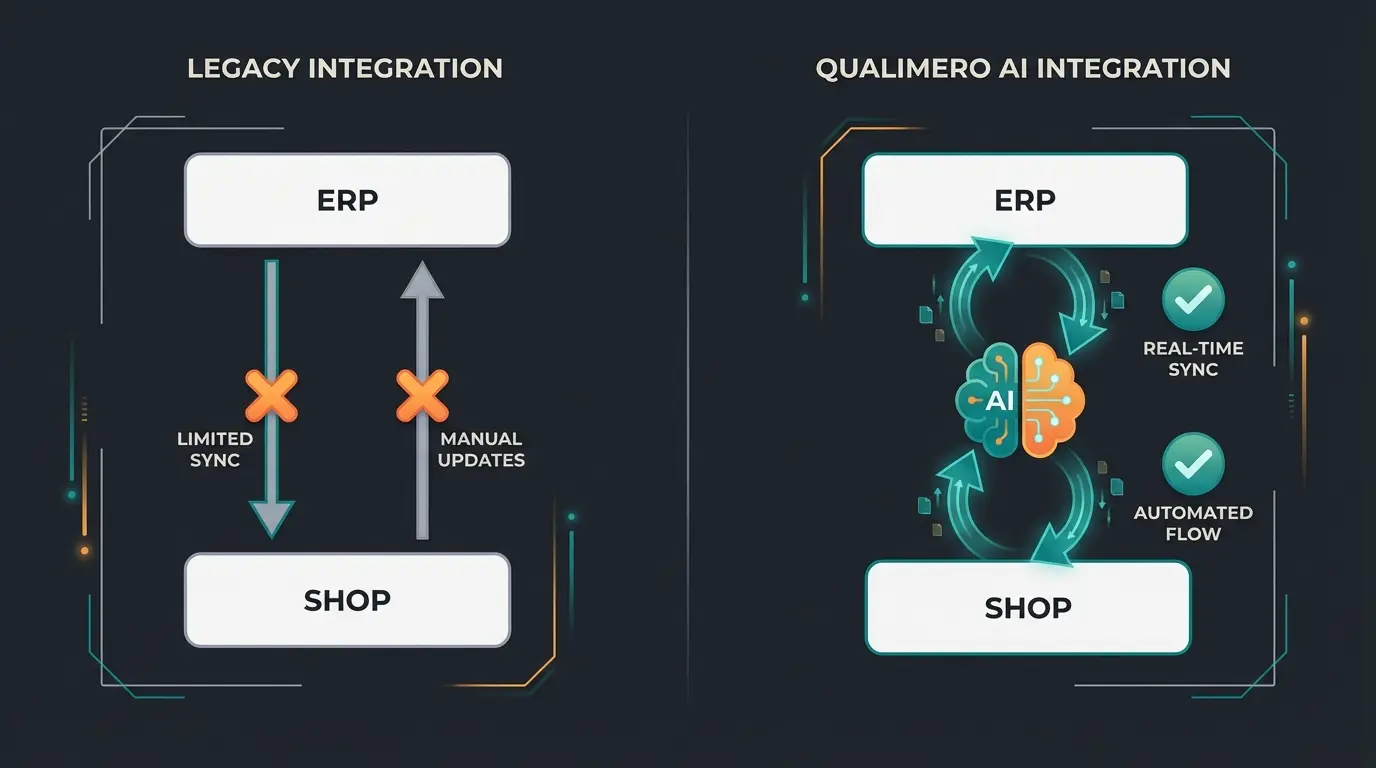
Standard Connector vs. AI-Integrated Solution
To clarify the added value of "Level 3," here's a direct comparison. This understanding is crucial when evaluating AI consultation cuts in development and operational costs:
| Feature | Standard Connector (Level 2) | AI-Integrated Solution (Level 3) |
|---|---|---|
| Data Synchronization | Periodic or real-time (rigid) | Event-based & predictive |
| Product Description | 1:1 copy from ERP (often cryptic) | AI-generated, SEO-optimized based on ERP attributes |
| Customer Consultation | None (only search function) | Chatbot/assistant with access to tech specs & compatibility |
| Cross-Selling | Manual assignment ("Customers also bought") | AI recommendation based on technical necessity & history |
| Error Handling | Log entry on error | Self-healing processes (e.g., auto-retry on API limit) |
| Stock Display | "In Stock" / "Out of Stock" | "In Stock - Forecast: Sufficient for 3 days at current sales rate" |
Step-by-Step: Preparing Your Data for AI Commerce
AI is only as smart as the data it receives. "Garbage in, garbage out" applies more than ever here. Proper data preparation is foundational to success in KI E-Commerce.
1. Structuring Data in Dynamics 365
Many companies use free-text fields for technical data in Dynamics. This is poison for AI.
To-Do: Use attributes or characteristics in Business Central. Structure data: "Length: 50" and "Unit: mm" in separate fields, not "50mm length" in a text field. This structured approach enables the AI to understand and process information correctly.
2. The Role of a PIM (Product Information Management)
Often, Dynamics alone isn't sufficient to maintain high-quality marketing data.
Recommendation: Evaluate whether to insert a PIM (like Akeneo or Pimcore) as an intermediary layer.
Flow: Dynamics (Hard Facts) -> PIM (Enrichment & Translation) -> Shopware (Sales). The AI can then access the structured data from the PIM to create consultation texts.
3. Cleaning Up Duplicates
Before you synchronize, clean up your customer data. Duplicate customer entries lead to chaos when the AI tries to analyze purchase history for AI product consultation recommendations.
Percentage of B2B companies reporting poor data quality as their biggest AI implementation challenge
Potential revenue uplift from AI-powered product recommendations with clean data
Reduction in customer service inquiries when AI consultation is properly implemented
Transform your Shopware Microsoft Dynamics integration from a simple data connector into an intelligent sales engine. Our AI consultation solution uses your ERP data to deliver personalized product recommendations that convert.
Start Free TrialChecklist for the DACH Market
If you operate in the German-speaking region, you must consider specific requirements that international plugins often overlook. This compliance framework is essential for any serious B2B e-commerce operation:
- E-Invoice (EN 16931): Does the integration support the return flow of ZUGFeRD/XRechnung documents to the customer portal?
- GDPR Compliance: Is customer data (personal data) encrypted during transfer? Where are the middleware servers located (if used)?
- DATEV Compatibility: Even though Shopware doesn't communicate directly with DATEV, Dynamics must prepare data so the tax advisor is satisfied. The integration must not destroy booking logic.
- VAT ID Validation: Does validation of the VAT ID occur live via the Federal Central Tax Office (BZSt) or VIES interface during checkout?
The Data Flow of Intelligent Commerce
Understanding the architecture of an AI-enhanced integration is crucial. Unlike traditional connector setups that simply mirror data between systems, Level 3 integration introduces an intelligent processing layer that transforms raw ERP data into actionable customer guidance.
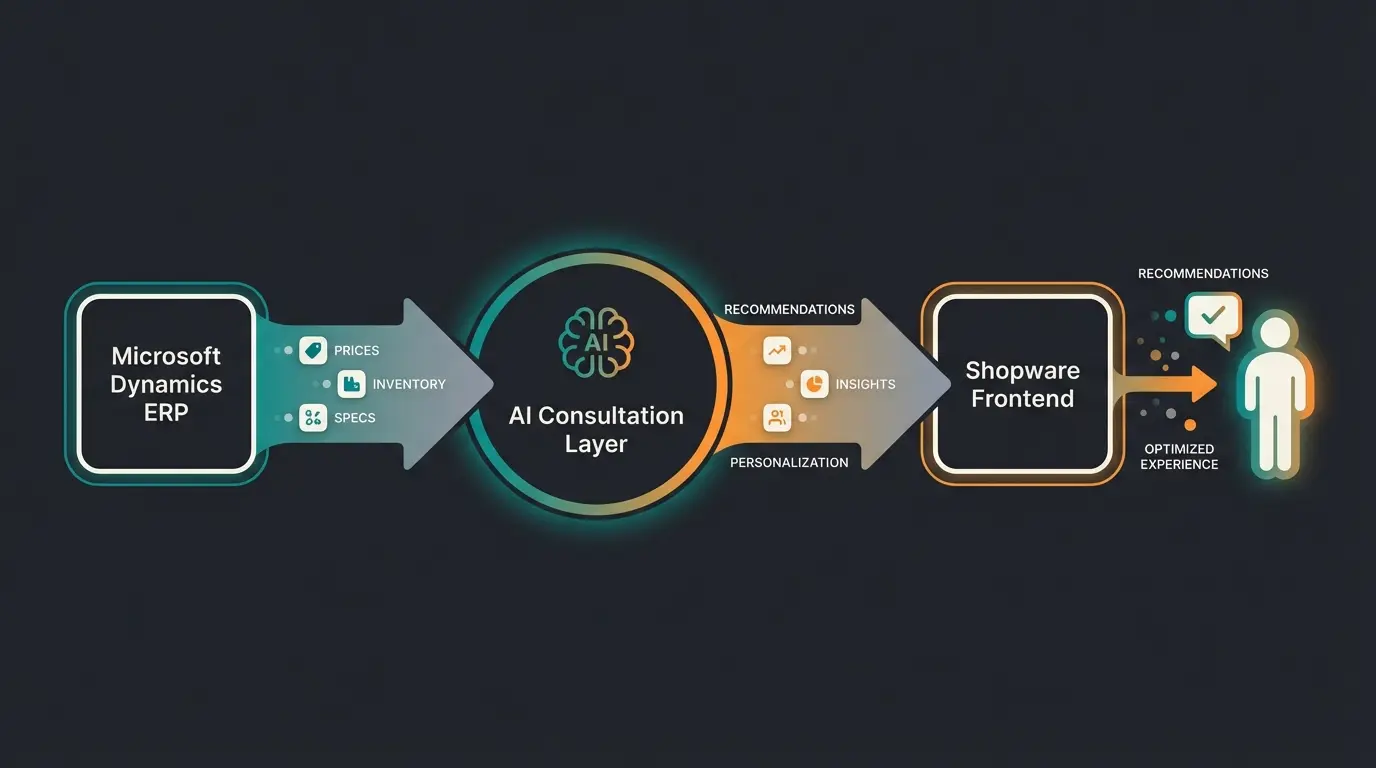
The key difference is that the AI layer doesn't just pass data through—it interprets, analyzes, and enhances it. When a customer asks a complex question, the AI pulls relevant attributes from the ERP, cross-references compatibility data, checks real-time inventory, and formulates a response that a human sales engineer would provide.
Frequently Asked Questions
Business Central (formerly NAV) is designed for small to medium-sized businesses and offers a complete ERP solution with financials, sales, service, and operations. Finance & Operations (formerly AX) is the enterprise-grade solution for larger organizations with more complex requirements, offering advanced manufacturing, supply chain, and financial capabilities. Most DACH mid-sized companies use Business Central, while larger enterprises typically deploy Finance & Operations.
A basic Level 2 connector integration typically takes 4-8 weeks for standard setups. However, a Level 3 AI-enhanced integration requires additional time for data structuring, AI training, and testing—usually 12-16 weeks for a comprehensive implementation. The timeline significantly depends on your data quality and the complexity of your B2B pricing logic.
Yes, Shopware 6 supports mixed B2B/B2C scenarios. However, the integration complexity increases significantly because you need to handle different pricing models, customer classification rules, and potentially different checkout flows. Many businesses opt for separate sales channels within Shopware while maintaining a unified Dynamics backend.
A well-designed integration should include fallback mechanisms. For inventory, you can use cached data with a recent timestamp. For pricing, the system can display the last known valid price while logging the issue for review. Critical integrations should implement circuit breaker patterns that gracefully degrade rather than completely fail.
Modern AI consultation systems use a combination of rule-based logic and machine learning. For new products, the AI relies on structured attribute data from the ERP to make recommendations based on similarity to existing products. As the product accumulates interaction data, the recommendations become more refined. This is why proper data structuring in Dynamics is essential from day one.
Conclusion: The Future Is Automated Consultation
The integration of Shopware and Microsoft Dynamics is no longer purely an IT project. It's a strategic business development initiative that determines your competitive position in the B2B marketplace.
Those who want to remain competitive in 2024 and beyond cannot be satisfied with merely having correct inventory levels in the shop. That's hygiene—the bare minimum. The competitive advantage emerges where you use the massive data volumes of your ERP system to offer genuine value to customers in the Shopware frontend—whether through AI-generated consultation, predictive order suggestions, or fully automated e-invoice compliance.
Action Recommendations
- Analyze your current integration status (Level 1, 2, or 3?) and identify specific gaps in your customer consultation capabilities.
- Talk to your agency not just about "interfaces" but about "data activation" and the revenue potential of intelligent product consultation.
- Prepare your ERP data now to be "AI-Ready"—structure attributes, clean duplicates, and establish data governance processes.
- Evaluate compliance requirements for e-invoicing, GDPR, and DATEV compatibility before your next integration phase.
- Start small with AI by implementing consultation for your most complex product categories first, then expand based on learnings.
Don't just connect systems. Connect your expert knowledge with customer needs.
Stop treating your Shopware Microsoft Dynamics integration as just a data pipe. Activate your ERP intelligence with AI-powered product consultation that guides customers through complex purchasing decisions—just like your best sales engineers would.
Book Your Demo Today