Introduction: The Illusion of Automated Sales
There's a widespread misconception in e-commerce: 'If I list my products on Amazon, eBay, and OTTO, sales will come automatically.' Technically speaking, taking this step has never been easier than today. For Shopware users, the Magnalister plugin has been the tool of choice for years to connect their online store with the massive reach of major marketplaces.
But reality often looks quite different. The traffic is there, the products are listed, but the conversion rate falls short of expectations. Why? Because we're confusing logistics with selling. Understanding this distinction is crucial for any merchant serious about Shopware multi channel success.
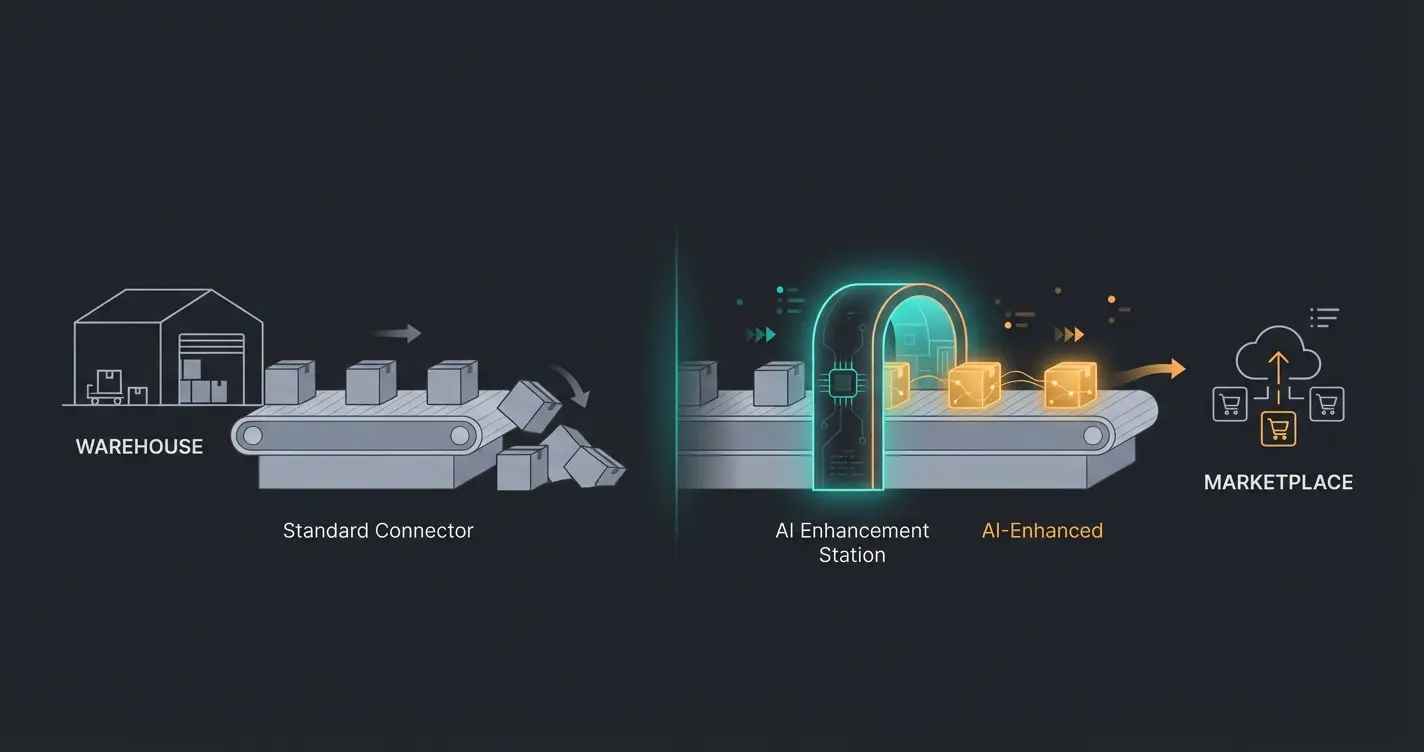
Magnalister is an excellent logistician. It's like a truck that reliably transports your goods (data) from warehouse A (Shopware) to warehouse B (Amazon). But a truck doesn't sell merchandise. It just unloads it. If what gets unloaded—your product descriptions, titles, and attributes—isn't compelling, even the best connection won't help.
In this comprehensive guide, we'll analyze not just how to technically set up Shopware and Magnalister perfectly. We'll take the crucial step further that most tutorials skip: how to use AI (Artificial Intelligence) to transform your 'gray data boxes' into irresistible offers before Magnalister delivers them. We're closing the gap between technical synchronization and real marketplace success.
Part 1: What Is Magnalister for Shopware? (The Foundation)
Before diving into optimization, we need to understand the foundation. According to Magnalister, it's one of the leading interface solutions in the DACH region and deeply integrated into the Shopware ecosystem. It functions as a bridge between your shop and the world's largest online marketplaces.
Core Functions and Technical Architecture
Magnalister isn't an external PIM (Product Information Management) that needs separate maintenance—it integrates directly into Shopware's backend. This means you work in your familiar environment. The official Shopware Store documentation confirms this seamless integration approach.
Here are the most important functions at a glance:
- Central Product Upload: You can transfer items directly from Shopware to marketplaces like Amazon, eBay, OTTO, Kaufland, Etsy, and METRO. You can choose whether to upload individual items or entire categories.
- Attribute Matching: This is one of the most critical functions. Marketplaces have specific requirements (e.g., Amazon requires certain 'Bullet Points' or eBay needs specific item characteristics). Magnalister lets you map Shopware properties (e.g., 'Color', 'Size') to corresponding marketplace attributes.
- Price and Inventory Synchronization: Prices can be controlled fully automatically or individually per marketplace. Inventory levels are synchronized in real-time. When an item sells on eBay, the stock in your Shopware shop is immediately reduced, preventing overselling.
- Automatic Order Import: Orders from marketplaces are imported into Shopware as if they were regular shop orders. This enormously simplifies accounting and shipping processes.
- Order Status Synchronization: When you mark an order as 'Shipped' in Shopware, Magnalister transfers this status including tracking code back to the marketplace.
Why Magnalister Is Essential for Shopware 6
With the switch to Shopware 6, the technical foundation changed fundamentally (Symfony Framework, Twig Engine). Magnalister responded to this and offers deep integration that utilizes Shopware 6-specific features. This level of integration is particularly valuable when combined with Shopware ERP integration for comprehensive business automation.
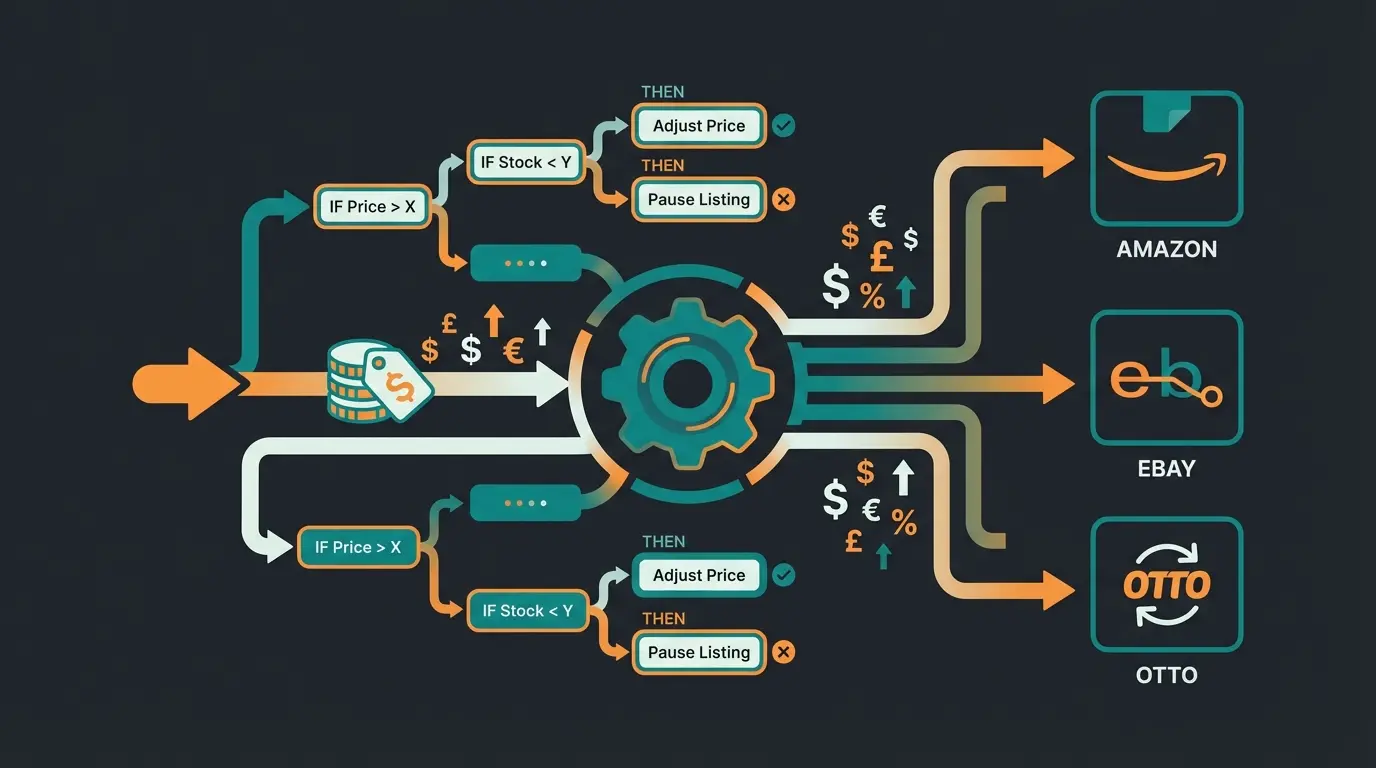
An outstanding example is the integration of the Rule Builder. In Shopware 6, you can create complex rules (e.g., 'Customer is from Germany AND cart > $50'). Magnalister picks up this logic. According to Magnalister's documentation, you can define in the plugin that a specific price rule from the Rule Builder should be applied for Amazon customers. This enables dynamic pricing that goes far beyond simple percentage markups.
Part 2: The Hidden Limitation – The 'Data Dump' Problem
If Magnalister is so powerful, where's the problem? The problem lies not in the tool, but in users' strategy.
The 'Garbage In, Garbage Out' Principle
Most shop operators maintain their product data in Shopware with a focus on their own online shop. In your own shop, you have your own branding and design, trust elements (trust badges, 'About Us'), and no direct competition on the product page.
On a marketplace like Amazon, all of that falls away. Your product stands naked next to ten competitors. When Magnalister copies your Shopware data 1:1 to Amazon (the classic 'Data Dump'), the following happens:
- Technical Language Instead of Sales Psychology: In Shopware, technical data is often in the foreground ('Cotton, 200g/m²'). But on the marketplace, the customer is searching for solutions ('Breathable and lightweight for summer').
- Missing Keywords: Your Shopware title might be 'Men's T-Shirt Basic'. On Amazon, the title needs to be 'Men's T-Shirt Basic Cotton Regular Fit Black' to rank in the algorithm.
- No Emotional Appeal: The 'consultation aspect' is completely missing—exactly what AI product consultation aims to solve.
The gap analysis of search results clearly shows: most tutorials end at technical setup, as documented by Hubyte. They explain how to transfer data, but not what quality this data needs to have to convert.
The 'Post-Connection' Gap
A gap emerges after connection. The merchant leans back because Magnalister's indicator light is 'green.' But a green light only means 'data format correct,' not 'offer attractive.' This is where merchants leave massive revenue on the table. Marketplaces are no longer just search engines; they're displacement competitions. Those who only synchronize inventory here lose to merchants who optimize their listings. This is precisely where AI guided selling strategies become critical.
Product listings with technical-only descriptions underperform optimized content by 68%
AI-optimized product content increases marketplace conversion rates by 1.5x on average
Shoppers abandon product pages that lack consultative, benefit-focused descriptions
Part 3: From 'Listing' to 'Consulting' – A New AI Approach
Here comes the paradigm shift. We need to stop seeing marketplaces as pure clearance ramps and start understanding them as Consultation-First Commerce channels. Since we can't personally advise customers there, our data must take over the consultation. And this is exactly where Artificial Intelligence (AI) becomes a game-changer.
The Concept: Logistics vs. Logic
Imagine the following division of labor:
- Magnalister (Logistics): Responsible for the 'hard facts.' Is the item available? What does it cost? What's its SKU?
- AI (Logic & Sales): Responsible for the 'soft skills.' How do I address the customer? What problems does the product solve? How do I stand out?
Instead of pushing data directly from Shopware to Magnalister, we insert an optimization layer. This approach mirrors what AI sales agents accomplish in direct customer interactions.
How AI Transforms Product Data
Current e-commerce trends for 2024 and 2025 show that hyper-personalization and AI-generated content are the dominant factors, as reported by Edisonda and G2.
Here are concrete examples of how AI makes the difference:
1. The Title Optimizer
- Shopware Original: 'Running Shoes Model X500'
- Magnalister Transfer (Standard): 'Running Shoes Model X500'
- With AI Optimization: 'Men's Running Shoes Cushioned – Model X500 for Marathon & Training – Breathable Mesh, Non-Slip'
The Effect: The AI analyzes search trends and enriches the title with relevant keywords and benefits without you having to do this manually. This is exactly how AI Product Consultation transformed one retailer's marketplace presence.
2. The 'Consultative' Description
- Shopware Original: 'Material: 100% Leather. Sole: Rubber. Color: Brown.'
- With AI Optimization: 'Experience the comfort of genuine leather that conforms to your foot. The robust rubber sole provides secure footing in any weather – ideal for the modern office day or long walks.'
The Effect: The AI transforms features into benefits. That's the difference between a data sheet and a sales conversation—the same principle that makes Shopware 6 chatbots so effective.
3. Attribute Cleanup
Uploads often fail due to incorrect attributes (e.g., 'Dark Blue' in the shop vs. 'Navy' as a required field on Amazon). AI tools can intelligently perform these mappings and predict errors before Magnalister attempts the upload, as noted in Shopware's documentation.

Stop losing sales to poor product data. Our AI consultation layer transforms your Shopware content into high-converting marketplace listings automatically.
Start Your Free TrialPart 4: Step-by-Step – Integrating Magnalister with AI Sales
How do you implement this in practice? Here's a blueprint for Shopware users.
Step 1: The Technical Foundation (Installation & Setup)
First, Magnalister must run cleanly. Installation is done via the Shopware Store.
- Download & Installation: Download the plugin from the Shopware Store (free, fees only apply upon use).
- Registration: Create an account with Magnalister and receive your passphrase.
- Connection: Enter the passphrase in the Shopware backend.
- Marketplace Connection: Select e.g., Amazon or eBay and authorize access (token generation). A helpful YouTube tutorial walks through this process visually.
Step 2: The AI Refinement (The 'Quality Layer')
Before you now click 'Prepare Products,' optimize your data. This is where KI E-Commerce strategies come into play:
- Option A (Manual with AI Support): Use tools like ChatGPT or Jasper to rewrite your top seller descriptions. Prompt example: 'Act as an experienced sales consultant. Rewrite this technical product description into an emotional benefit text for Amazon. Integrate the following keywords: [list].'
- Option B (Automated AI Plugins): There are now Shopware plugins that offer AI text generation directly in the backend. Let the AI fill the fields 'Meta Description' or an additional field 'Marketplace Description.'
- Mapping in Magnalister: Configure Magnalister so that it pulls not the standard field `description` for the description, but the new, AI-optimized field `marketplace_description`. This is done via the configuration in the 'Product Preparation' tab.
Set up the plugin via Shopware Store, connect your account, and authorize marketplace access
Review your existing Shopware content for technical language, missing keywords, and lack of emotional appeal
Use AI tools to transform product titles, descriptions, and attributes into conversion-optimized content
Set Magnalister to pull AI-optimized fields instead of standard Shopware descriptions
Launch the synchronization and track conversion improvements across marketplaces
Step 3: Strategic Pricing with the Rule Builder
Leverage the power of Shopware 6. Marketplaces often require shipping-inclusive prices or have high fees (around 15%). According to Magnalister's pricing documentation:
- Create a rule 'Marketplace Markup' in the Rule Builder.
- Define: 'If sales channel = Amazon, then price + 15%'.
- Go to `Configuration -> Price Calculation` in Magnalister.
- Under 'Sales price from price rule,' select your created rule.
This is a massive advantage over other systems because you don't have to maintain rigid price lists but can use dynamic logic.
Step 4: The Feedback Loop
After upload comes optimization. Understanding this continuous improvement cycle is essential for any Shopware B2B guide implementation:
- Check the error logs in Magnalister. According to DataFeedWatch, issues are often minor things like missing EANs or titles that are too long.
- Use inventory synchronization. When you notice a product taking off on eBay (thanks to your new AI texts), Magnalister ensures the inventory in the Shopware shop is immediately adjusted to avoid empty sales.
Part 5: Magnalister Alternatives (And Why You Still Need AI)
The market for multichannel software is large. A look at competitors helps sharpen your own strategy.
The Top Alternatives Compared
| Provider | Focus | Strength | Weakness |
|---|---|---|---|
| Magnalister | Shop Integration | Deep Shopware integration, price-performance ratio, simplicity | Fewer feed optimization features than Channable |
| Channable | Feed Management | Excellent 'if-then' rules for data feeds, strong in marketing (Google Shopping) | More expensive, external platform (not in shop backend) |
| Brickfox | Middleware / ERP | Control of complex multichannel structures, also connects WaWi. According to Webversiert | High complexity, often 'overkill' for pure Shopware users, more expensive |
| Lengow | Internationalization | Strong for cross-border commerce | Pricing structure often non-transparent for SMBs |
The Bottom Line on Alternatives
Whether you use Channable, Brickfox, or Magnalister: none of these tools write sales-strong texts for you. They're all 'logistics tools.' Channable can create rules like 'If title empty, take description,' but it can't write creatively. The 'Garbage In, Garbage Out' problem remains with all of them.
Magnalister often wins for Shopware users because it has the lowest barrier and works directly in the system, which makes maintaining AI-optimized fields in one central location (Shopware) easier. This is confirmed by Shopware's community reviews.
Part 6: Practical Tips & Common Errors (Troubleshooting)
From analyzing support forums and FAQs, the following pitfalls emerge that you should avoid:
1. The EAN/GTIN Problem
Marketplaces like Amazon insist on valid EANs.
- Error: Merchants use internal numbers or leave the field empty.
- Consequence: Magnalister reports errors, product isn't listed.
- Solution: Before uploading, check that all products in the Shopware `ean` field have valid values. Use AI tools to potentially enrich missing data from manufacturer catalogs.
2. Variant Chaos
Shopware handles variants (size/color) differently than eBay.
3. Price Rule Conflicts
If you delete a rule in the Shopware Rule Builder that's stored in Magnalister, Magnalister falls back to the standard price. This knowledge directly applies to how AI Chatbots transform customer interactions—precision in setup prevents costly errors.
Warning: This can get expensive if suddenly the cheaper shop price (without marketplace fee) goes live on Amazon. Regularly check your price rules.
4. Image Guidelines
Amazon requires a white background for the main image. Your Shopware image might be a lifestyle shot.
AI Tip: Use AI image editing tools to automatically remove the background for image 1, and save this as 'Marketplace Image' in Shopware. Magnalister can be configured to pull this specific image.
Part 7: Costs and ROI
Magnalister's pricing is transparent, but you should keep total costs in view. According to Magnalister's pricing page:
- Business Plan: Starts at approximately $49/month (as of 2025)
- Ultimate Plan: Includes more items and orders
- Flat Plan: For large merchants with many SKUs
- Installation Service: Optional for approximately $29-$39
The ROI Leverage
If you only pay for Magnalister, you have costs for reach. If you additionally invest in AI optimization (time or tools), you increase conversion. The same ROI principles apply when deploying AI product consultants across your commerce stack.
- Calculation: 10,000 views on Amazon x 1% conversion (standard data) = 100 sales.
- With AI Optimization: 10,000 views x 1.5% conversion (better texts/images) = 150 sales.
The costs for Magnalister stay the same, but revenue increases by 50%. That's the leverage of the 'Consultation-First' strategy.
Same traffic, same Magnalister costs, but 50% more sales through optimized content
Magnalister Business plan starting price for full marketplace connectivity
Test the complete Magnalister integration before committing
Conclusion: The Future Belongs to 'Intelligent Logisticians'
The connection of Shopware and Magnalister remains the gold standard for German online merchants to quickly expand to marketplaces. The technical maturity of the plugin, especially in combination with Shopware 6 features like the Rule Builder, is impressive.
But technology alone no longer wins market share in 2025. Competition is too fierce, customers too demanding. The key to success lies not in being on Amazon, but in how you appear there. This is the exact insight that led to success stories like AI Employee 'Kira'.
By using Magnalister for what it is—a powerful logistics tool for data—and combining it with the intelligence and creativity of AI, you create an unfair competitive advantage. You don't just deliver products; you deliver sales conversations, emotions, and solutions. When comparing Shopware vs Shopify, this AI integration capability often becomes the deciding factor for complex product catalogs.
Action Recommendations
- Install Magnalister for the basic connection.
- Ignore the impulse to immediately upload everything.
- Analyze your product data: Is it 'warehouse language' or 'customer language'?
- Use AI to refine your data.
- Start the sync and watch visitors become buyers.
FAQ: Common Questions About Shopware & Magnalister
Yes, Magnalister is fully compatible with Shopware 6 and supports new features like the Rule Builder and Experience Worlds. The integration takes advantage of Shopware 6's modern Symfony framework architecture for optimal performance.
Prices start at $49 per month for the Business plan. There's a 30-day free trial period so you can test the full functionality before committing. Higher tiers offer increased article and order limits for larger operations.
No, installation is done via the Plugin Manager. There are wizards for configuration. Only for very specific customizations (hook points) are PHP skills helpful. Most merchants can set up the basic integration without any coding.
Magnalister is directly integrated into the Shopware backend (plugin), while Channable is an external platform. Magnalister is often cheaper and simpler for direct marketplace connections, while Channable is stronger in feed management for marketing channels like Google Shopping.
Yes, Magnalister synchronizes inventory levels and prices automatically. Sales on Amazon immediately reduce the stock in Shopware, preventing overselling. The cronjob settings determine the synchronization frequency.
Yes, via 'Price Groups' or in Shopware 6 via the 'Rule Builder,' you can define individual prices and currencies for each marketplace. This allows you to account for different marketplace fees and shipping requirements automatically.
Combine Magnalister's logistics power with AI-driven content optimization. Start converting more marketplace visitors into paying customers today.
Get Started Free