
Introduction: Why This Upgrade Is More Than Just Tech
If you're reading this article, you're likely standing at a crossroads where many e-commerce managers and CTOs find themselves in 2025. Official support for Shopware 5 ended in July 2024 according to Shopware, and while extended support solutions like Safefive offer a temporary lifeline as documented by safefive.de, you know the clock is ticking.
But let's be honest: A Shopware 5 to 6 upgrade is not a simple update. It's not a button you press on Friday afternoon to wake up with new features on Monday. It's a re-platforming – a complete system change as explained by solution25.com. That sounds like pain, costs, and risk.
But what if we changed the perspective? What if this upgrade is not just a technical necessity to close security gaps, but the key to an entirely new way of selling? While most agencies talk about "better performance" and "new admin interfaces," they overlook the real potential of Shopware 6: The API-first architecture as a gateway to AI-powered sales consultation.
In this comprehensive guide, we'll not only guide you safely through the technical migration process and the pitfalls of GDPR compliance. We'll also show you how to use the upgrade to transform your shop from a static catalog into an intelligent sales consultant. Discover how AI-powered product consultation can revolutionize your customer experience and drive meaningful revenue growth.
Why the Upgrade Is Inevitable (Hard Facts)
Before we dive into strategy, we need to put the hard facts on the table. Holding on to Shopware 5 in 2025 is no longer just "conservative" – it's a business-critical risk.
1. The Security Vacuum (End-of-Life)
Since July 2024, Shopware 5 no longer receives official security updates from the manufacturer as confirmed by arboro.de. While third-party providers like Safefive continue to offer patches, this is purely a maintenance measure according to area-net.de. No new features are being developed, no compatibility with new PHP versions is guaranteed, and no innovations are being integrated. A Shopware 5 shop today is a technological dead end.
2. Technical Debt vs. Modern Architecture
The technological foundation of Shopware 5 (Zend Framework, Smarty, ExtJS) is outdated as detailed by gitconnected.com. Developers who master these technologies are becoming rarer and more expensive. Shopware 6, on the other hand, is based on Symfony and Vue.js. This means:
- Lower maintenance costs: Modern code is faster to debug and extend
- Future-proofing: Symfony is the industry standard for PHP frameworks
- Headless capability: The frontend is decoupled from the backend, enabling entirely new sales channels (mobile apps, social commerce)
3. Performance as a Ranking Factor
Google has long made Core Web Vitals a ranking factor. The monolithic structure of Shopware 5 often struggles here with bloated code. Shopware 6 is significantly more performant due to its modular design and modern caching mechanisms (like out-of-the-box Varnish/Redis support). An upgrade is therefore also a direct SEO measure. Understanding how running AI tools affects page speed is crucial for maintaining optimal performance.
No more security updates from Shopware
Unpatched vulnerabilities accumulate daily
Full re-platforming requires careful planning
With AI-powered guided selling implementation
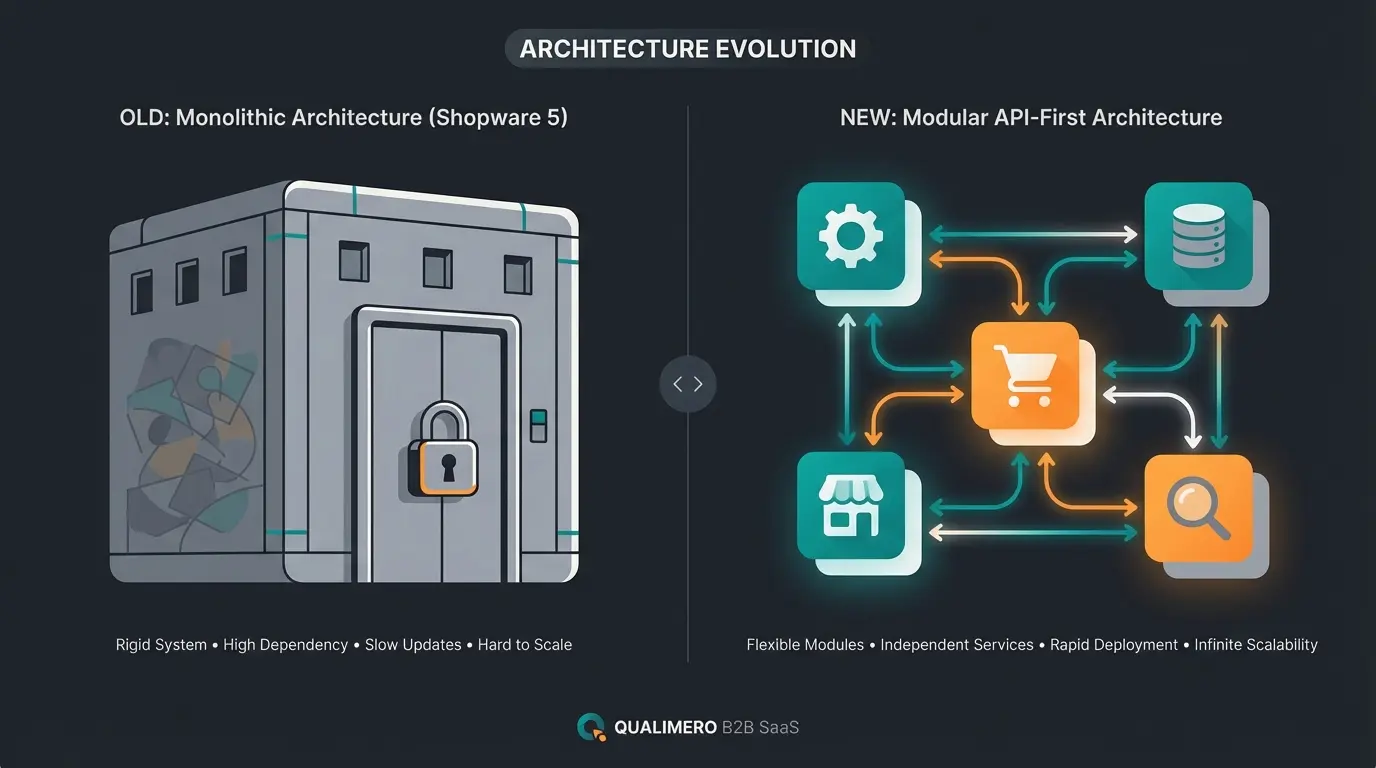
Shopware 5 vs. Shopware 6: The Key Differences
To properly plan the project, you need to understand that you're not comparing apples to apples. Shopware 6 is a complete redevelopment. Here's the direct comparison of technologies that will impact your e-commerce daily operations:
| Feature | Shopware 5 (The Monolith) | Shopware 6 (The Platform) | Meaning for Your Business |
|---|---|---|---|
| Architecture | Monolithic (Frontend & Backend tightly coupled) | API-First (Headless Ready) | Enables connection of AI tools, apps, and ERPs in real-time |
| Core Technology | Zend Framework, jQuery | Symfony, Vue.js, Bootstrap | Better performance, easier to maintain code, cheaper development |
| Template Engine | Smarty (outdated) | Twig (modern & flexible) | Warning: Old themes are incompatible and must be rebuilt |
| Admin Interface | Window-based (ExtJS), often slow | Browser-based (Vue.js), fast & intuitive | Faster onboarding of new employees, more efficient work |
| Data Structure | Shopping Worlds | Shopping Experiences | More flexible content marketing, but old Shopping Worlds must be manually migrated |
| AI Capability | No native integration | Native AI Copilot + API for external AI | The key to automated processes and intelligent consultation |
The Decisive Difference: API-First
In Shopware 5, the API was often an "add-on." In Shopware 6, it's the heart of the system as noted by coding9.de. Every function available in the admin area can also be controlled via the API. This is the reason why Shopware 6 is the perfect foundation for Artificial Intelligence: Your AI can "control" the shop, retrieve products, and trigger customer actions without requiring complex plugins to be written.
This API-first approach opens the door for AI sales agents to interact seamlessly with your product catalog and customer data. The enhanced AI capabilities of Shopware 6 represent a paradigm shift in how online stores can serve customers.
The Underestimated Danger: Data Migration & GDPR
Most international guides ignore this point, but for German shop operators it's critical: The migration is a data protection minefield.
The "Data Dump" and Article 5 GDPR
Many Shopware 5 shops have been running for 10 years or longer. The databases often contain hundreds of thousands of customer records from people who haven't ordered in years. Under the GDPR, the principle of storage limitation (Art. 5 Para. 1 lit. e GDPR) and data minimization applies according to haendlerbund.de and it-daily.net. Personal data may only be stored as long as it is necessary for the purpose.
As explained by projekt29.de, understanding data retention requirements is essential before any migration project. The risk is real: migrating outdated customer data can create significant legal exposure.
The Opportunity: "Clean Slate" for Your AI
Here's where the risk becomes an opportunity. Use the migration for a radical spring cleaning:
- Filter before migration: Define rules (e.g., "Don't migrate customer accounts that have been inactive for >3 years")
- Performance boost: A leaner database makes the new Shopware 6 shop blazingly fast
- AI training: If you want to use AI tools later to predict customer behavior, old, irrelevant data ("noise") is harmful. Clean, current data ("signal") massively improves the quality of your AI recommendations
Step-by-Step Guide: Shopware 5 to 6 Migration
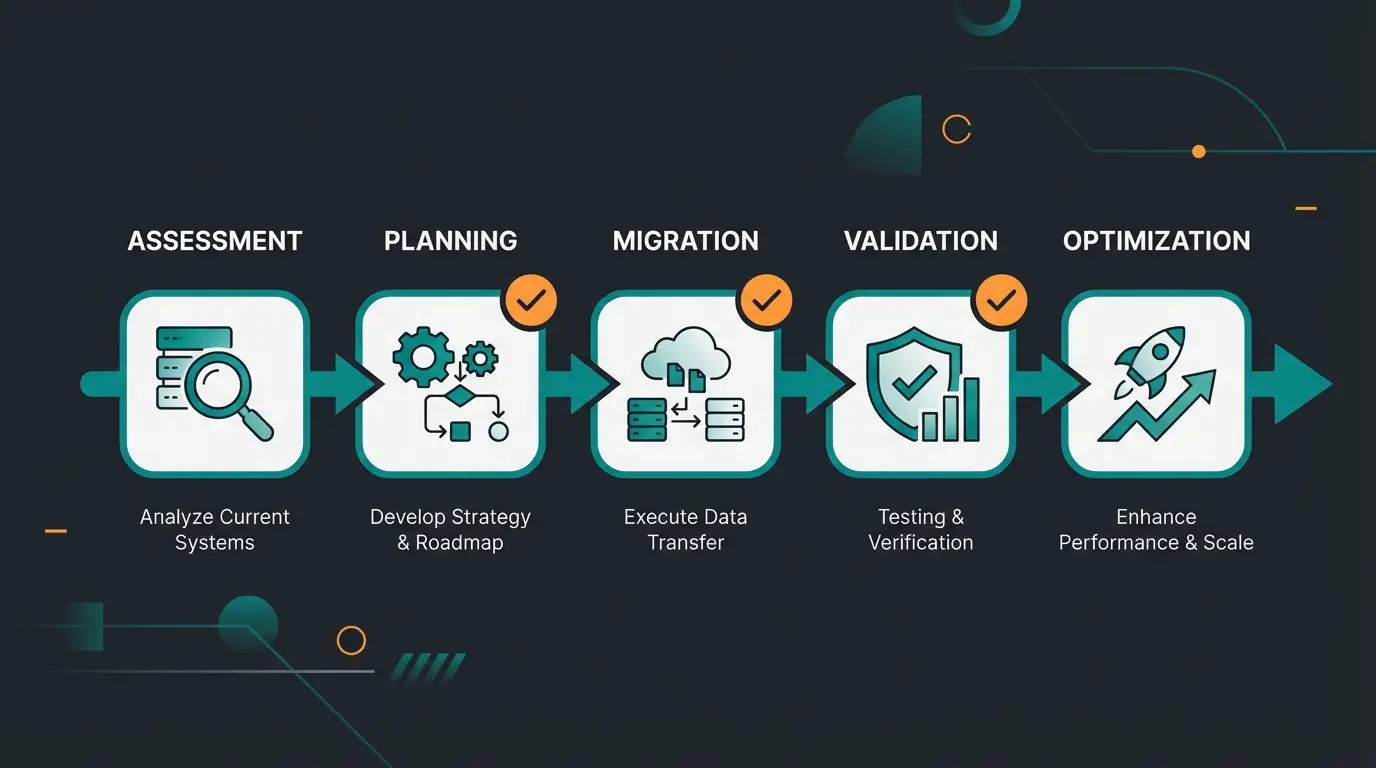
A Shopware 5 to 6 upgrade is a project that must be divided into phases. Here's the proven roadmap to avoid technical disasters.
Inventory all SW5 plugins, check SW6 compatibility, identify processes to modernize
Filter inactive customer data, clean database, ensure legal compliance
Build new Twig-based theme, migrate data to staging environment
Comprehensive QA testing, create 301 redirect maps for all ranking URLs
Switch domain to new server, monitor for issues, verify payment integrations
Phase 1: Analysis & Inventory
Before you write a single line of code:
- Plugin check: List all SW5 plugins. Check in the Shopware Store whether a SW6 version exists. Warning: Many old plugins no longer exist or their functionality is now included in the Shopware 6 core (e.g., Rule Builder replaces many promotion plugins) as documented by itdelight.io
- Process audit: Use the opportunity to cut old habits. Do you really need to keep that complex checkout process from 2016, or isn't the standard SW6 checkout more conversion-friendly?
Phase 2: System Environment (Staging)
Install Shopware 6 on a completely new server environment. Never attempt to perform the upgrade in live operation.
- System requirements: Check PHP versions (SW6 requires newer PHP versions, often 8.1 or 8.2) and database compatibility according to endoflife.date
- Parallel operation: Your SW5 shop continues running while you build the SW6 shop on the staging server
Phase 3: The Migration Assistant
Shopware offers a powerful tool: The Migration Assistant as detailed in the official documentation.
- Connection: Install the "Migration Connector" in SW5 and the "Migration Assistant" in SW6
- Data selection: Choose what should be migrated (products, customers, orders, categories)
- Checksums: The assistant remembers what has already been migrated. You can run the migration multiple times to sync only new data (e.g., new orders during the development phase)
According to elixentdigital.com, these migration limitations are frequently underestimated by shop owners, leading to project delays and budget overruns.
Phase 4: Asset Transfer & Thumbnail Generation
A common mistake: The database is there, but the images are missing.
- Media migration: The assistant transfers the paths, but often the physical files must be copied separately
- Thumbnail trap: In Shopware 6, thumbnails must be regenerated (`bin/console media:generate-thumbnails`). A known bug is that SW6 by default only processes a limited number of thumbnail sizes, which can lead to missing images in the frontend as noted by 2hatslogic.com and winkelwagen.de. Configurations may need to be adjusted here
Phase 5: Go-Live & SEO Protection
The most critical moment.
- 301 Redirects: The most important thing for your Google ranking. Since URL structures change (e.g., technical URLs), you must set up a 301 redirect for every ranking URL of the old shop to its new counterpart. Use plugins or `.htaccess` for this as recommended by Shopware documentation and solution25.com
- DNS Switch: Switch the domain to the new server
- Payment Check: Test PayPal and Klarna intensively. In the past, there were often conflicts between PayPal Plus (SW5) and the new PayPal Checkout (SW6), as well as problems with Klarna display in checkout according to Shopware community forums
Don't just migrate – transform. Our AI consultation experts help you upgrade your shop while integrating intelligent product advisors that boost conversion rates from day one.
Get Your AI Strategy ConsultationPost-Upgrade: How AI Instantly Boosts Revenue
Now you have a modern Shopware 6 shop. Most merchants stop here. But you're going one step further. You're using the API-first architecture to deploy AI not just for cost reduction, but for revenue generation.
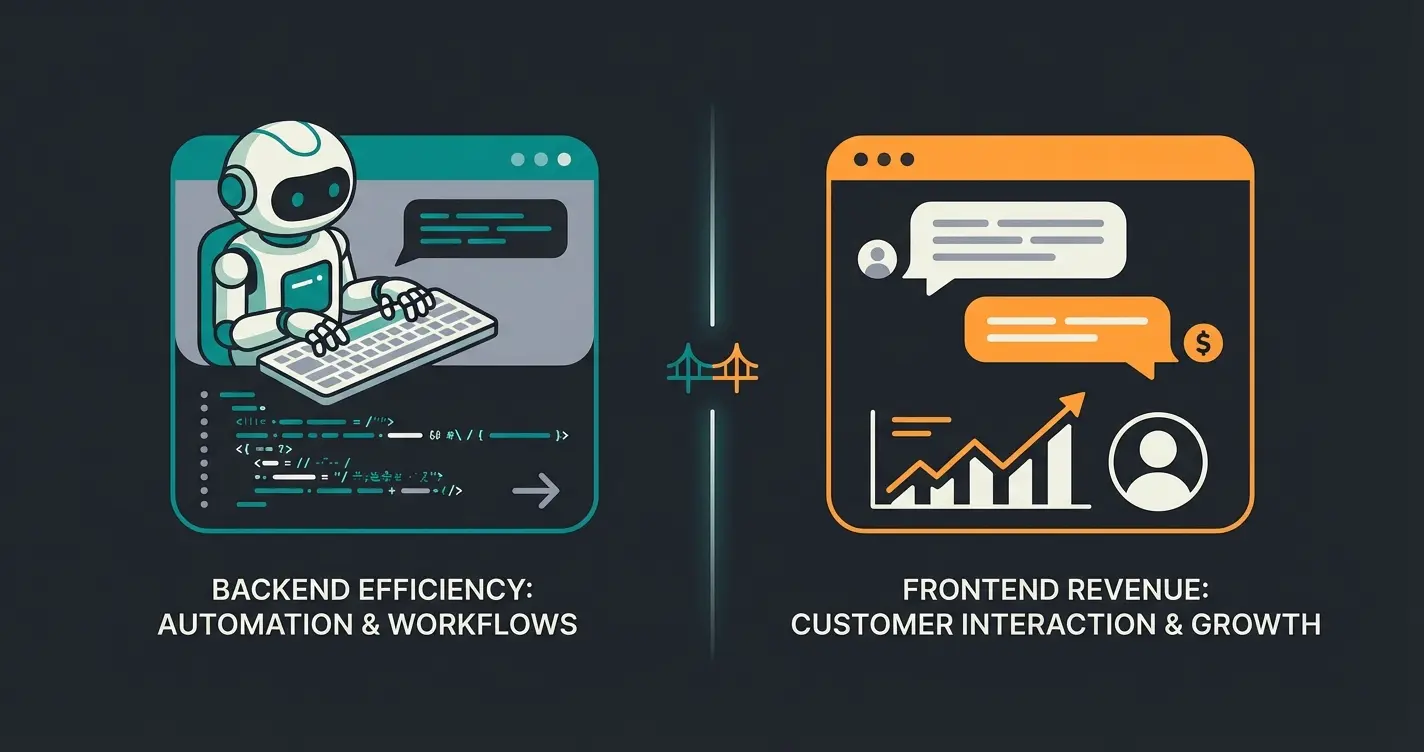
Status Quo: Backend AI (Efficiency)
Shopware already offers solid tools with the AI Copilot as documented by Shopware and codixio.com:
- Automatic generation of product descriptions
- Summarization of reviews
- Image keywords for SEO
This saves time in the backend. But does the customer notice anything? Hardly.
Your Strategy: Frontend AI (Consultative AI)
The content gap in almost all guides is AI-powered sales consultation. In Shopware 5, it was extremely difficult to deeply integrate external AI tools into the shop. In Shopware 6, it's simple thanks to API-first architecture.
The Concept: "Guided Selling 2.0"
Imagine you're selling running shoes.
Old (Filter): The customer clicks "Size 42," "Blue," "Nike." They get 50 results and are overwhelmed ("Paradox of Choice") as documented by Qualimero research.
New (AI Consultant): A chatbot or interactive advisor asks: "Where do you usually run? Asphalt or trails?" – "Trails." – "Do you have any joint problems?" – "Yes, knees."
The AI uses these answers, accesses your product catalog in real-time via the Shopware 6 API, and recommends exactly three models with reasoning: "This shoe has the best cushioning for trail running with knee problems."
This is the essence of AI product consultation – transforming passive browsing into active guidance. Learn how AI sales assistants can completely change your customer interaction model and drive meaningful engagement.
Why Shopware 6 Is Necessary for This
- Real-time data: The AI needs to know which sizes are currently in stock. The SW6 API delivers this in milliseconds
- Attribute mapping: Shopware 6 properties can be perfectly read by LLMs (Large Language Models)
- Cart control: The AI can add the product directly to the cart (via API) without the customer having to search
The AI-powered sales consultants built on Shopware 6 represent a new frontier in e-commerce. Through Conversational Commerce, businesses are seeing transformative results in customer satisfaction and conversion rates.
The Business Case
Studies show that guided selling can double conversion rates and reduce returns because customers buy products that actually fit according to Qualimero analysis. You're positioning the upgrade not as an "IT cost center" but as a "sales offensive."
Consider how AI employees revolutionize not just sales but entire customer service operations. The AI-powered product recommendation systems available for Shopware 6 can analyze customer intent in ways that were impossible with legacy systems.
For B2B operations, explore how AI-powered digital portals can streamline complex ordering processes. The AI-powered product consultation capabilities extend beyond just sales to comprehensive customer service automation.
Guided selling doubles purchase completion
Customers buy products that truly fit their needs
Shopware 6 delivers real-time product data
AI consultants never sleep, never take breaks
Conclusion & Decision-Maker Checklist
The Shopware 5 to 6 upgrade is complex, but it's the only logical consequence for future-oriented e-commerce companies. Those who act now not only escape security risks and GDPR traps but also secure a competitive advantage in the AI era through the new architecture.
Your Checklist for Getting Started
- Set timeline: Plan 4-6 months. Start now, even if Safefive is still running
- Data audit: Identify "dead" customer data and exclude it from migration (GDPR win & AI win)
- Budget for redesign: Accept that the old theme is history. Invest in a modern Twig-based design
- SEO plan: Create a redirect map before you launch the new shop
- AI vision: Don't settle for standard features. Plan the integration of an AI sales consultant to maximize the ROI of your upgrade
The strategic value of AI product consultation extends beyond immediate sales gains to long-term SEO benefits and customer loyalty improvements.
Frequently Asked Questions
While not technically "mandatory," it's effectively unavoidable for serious e-commerce businesses. Shopware 5 reached end-of-life in July 2024, meaning no more official security updates. Extended support solutions like Safefive provide temporary patches, but no new features or PHP compatibility updates. Running an unsupported e-commerce platform creates significant security and compliance risks.
A realistic timeline is 4-6 months for most shops. This includes: Month 1 for audit and plugin compatibility checks, Month 2 for data cleanup and GDPR compliance review, Month 3 for staging migration and theme recreation in Twig, Month 4 for comprehensive testing and SEO redirect setup, followed by the go-live DNS switch. Complex shops with many customizations may require additional time.
Not if you plan properly. The key is implementing comprehensive 301 redirects for every ranking URL before switching. Since URL structures often change between SW5 and SW6, create a complete redirect map. Expect a temporary ranking fluctuation (1-4 weeks) during Google's recrawl, but with proper redirects and maintaining content quality, rankings typically recover and often improve due to better Core Web Vitals scores.
No, Shopware 5 themes (built with Smarty templates) are completely incompatible with Shopware 6 (which uses Twig). You'll need to either purchase a new SW6 theme, rebuild your existing design in Twig, or use the standard Storefront theme as a base for customization. Budget for theme development or purchase in your migration costs.
The Migration Assistant can transfer: products, categories, customers, orders, manufacturers, properties, and media assets. However, Shopping Worlds/Experiences must be manually recreated, SEO URLs often need manual adjustment, and custom plugin data may require special handling. The assistant supports incremental migration, allowing you to sync new orders during the development phase.
Don't just switch technology – integrate AI Consultation directly into your new Shopware 6 instance. Transform your shop from a static catalog into an intelligent sales advisor that guides customers to the perfect products 24/7.
Start Your AI-Powered Migration