
Why Your Instagram Feed Is Only Half the Battle
Imagine you run an exclusive boutique in downtown Munich. Your window display is perfectly decorated, the lighting is just right, and passersby stop to admire the arrangement. But when they enter the store, nobody is there. No greeting, no consultation, just shelves.
That's exactly what's happening right now in thousands of Shopware online stores.
Merchants invest heavily in Shopware Instagram Shopping, optimize their feeds, and generate traffic. Users click on "Shop Now," land on the product detail page – and are left completely alone. The result: high bounce rates despite visually appealing content.
In this comprehensive guide for 2025, we go beyond standard tutorials. We'll show you not only how to lay the technical foundation in Shopware 6 and select GDPR-compliant plugins. We reveal the missing puzzle piece in social commerce: AI-powered product consultation.
Learn how to transform your store from a passive catalog into an active sales advisor, and why 2025 is the year when "Agentic Commerce" makes the difference between scrolling and purchasing. As explored in our comprehensive Shopware AI features guide, artificial intelligence is revolutionizing how online stores interact with customers.
The Basics: Understanding Outbound vs. Inbound Shopping
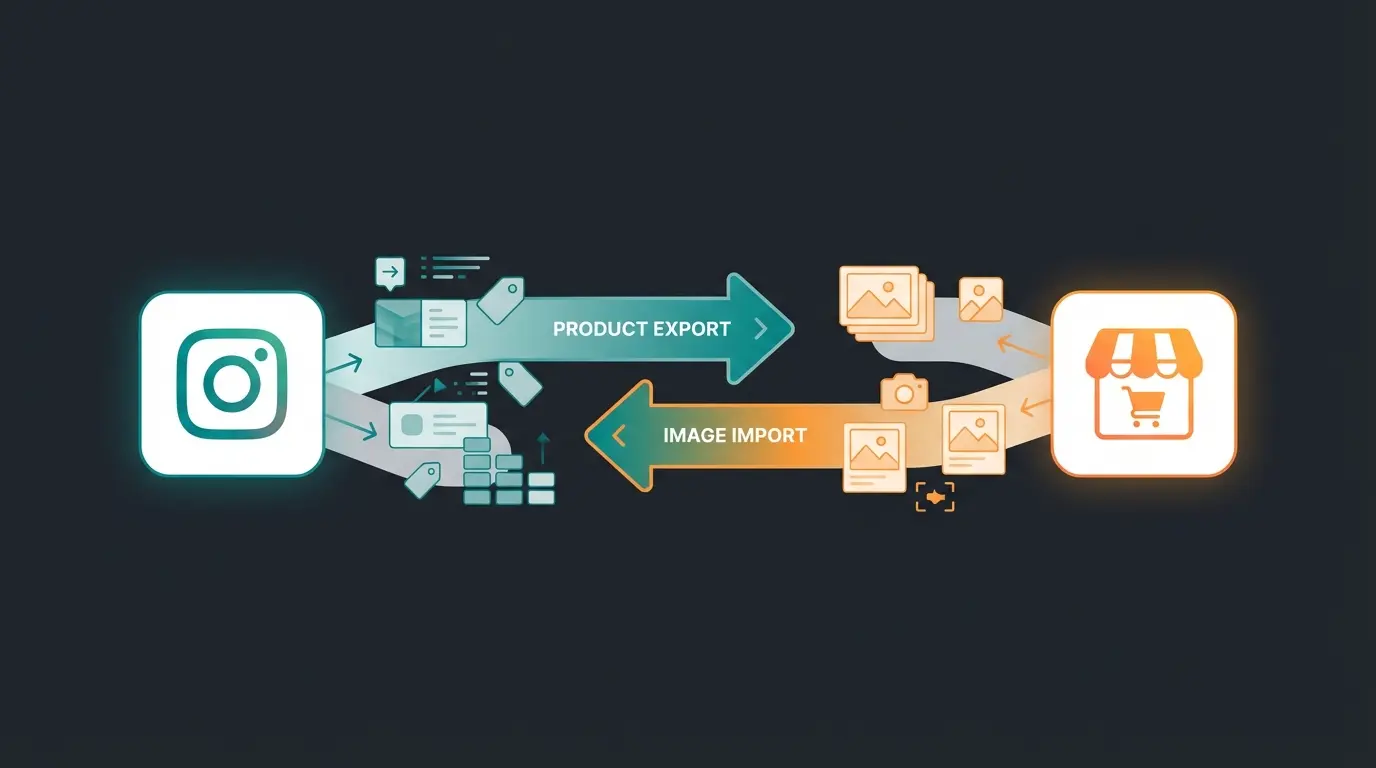
Before we dive into the technical details, we need to clear up a widespread misconception in the Shopware ecosystem. When merchants talk about "Instagram Shopping," they often mean two completely different technical processes. For a successful strategy, you need both.
Outbound: Social Shopping (The Export)
This involves sending your product data from Shopware out to Meta (Facebook/Instagram).
- Goal: Make products taggable on Instagram (Shoppable Posts) and populate the Facebook catalog
- Technology: This is a native feature of Shopware 6 (Sales Channels). According to Shopware, the Sales Channels functionality allows direct integration with Meta's commerce infrastructure
- Benefit: Reach and traffic generation
Inbound: Shoppable Feeds (The Import)
This involves pulling User-Generated Content (UGC) or your own Instagram feed into your Shopware storefront.
- Goal: Generate social proof on the homepage or product detail page (PDP)
- Technology: This requires a plugin, as Shopware doesn't display this visually in its standard configuration
- Benefit: Trust building and conversion optimization
Step-by-Step Setup: Technical Foundation in Shopware 6
Setting up Shopware Instagram Shopping has changed slightly with the updates in 2024 and 2025. Shopware has deeply integrated the "Social Shopping" extension into the Sales Channels, as detailed in their official documentation at Shopware.
Step 1: Data Preparation (Dynamic Product Groups)
Before connecting Instagram, you need to define what should be sold.
- Navigate in Shopware Admin to Catalog > Dynamic Product Groups
- Create a new group (e.g., "Instagram Feed 2025")
- Important: Filter out products that have no images or are not available. Meta often rejects feeds with faulty data entirely
- Pro Tip: Use custom fields to specifically mark products for social media (e.g., "Social_Highlight" = true)
Step 2: Setting Up the Sales Channel
Shopware 6 uses the concept of "Sales Channels." This powerful feature allows you to manage multiple selling platforms from one backend. For those looking to enhance their sales process further, AI Product Consultation can significantly improve customer engagement.
- Click on the plus symbol (+) next to "Sales Channels"
- Select Instagram (or Facebook, as the backend is the same) from the list of Social Shopping extensions. According to YouTube tutorials, this process has been streamlined in recent versions
- Link the previously created Dynamic Product Group
- Currency & Language: Make sure these match your Instagram Business profile. Discrepancies lead to rejections in Commerce Manager
Step 3: Connecting to Meta Business Manager
This is where many merchants fail. The export from Shopware isn't a "live push" but usually a CSV/XML feed that Facebook retrieves. As explained by Pixupmedia, proper feed configuration is critical for successful synchronization.
- Copy the export URL that Shopware generates in the Sales Channel
- Go to Facebook Commerce Manager > Data Sources > Data Feed
- Select "Scheduled Feed" and paste the Shopware URL
- Recommendation: Set the update interval to "Hourly" if your inventory levels change quickly
Step 4: Domain Verification
For Instagram to allow "Shoppable Posts," the domain must be verified. This happens in Facebook Business Manager under "Brand Safety."
- Download the HTML file from Facebook
- Upload it to the `public` directory of your Shopware installation (via FTP) or use a plugin for header tags to insert the meta tag
Create dynamic product groups and filter products with images
Set up Instagram/Facebook Sales Channel in Shopware Admin
Link export URL and configure scheduled feed updates
Complete domain verification in Facebook Business Manager
Inbound Strategy: Visual Social Proof & GDPR Compliance
After your products are on Instagram, you need to bring the visual charm of Instagram back into your shop. This requires extreme caution in Germany and the EU.
The GDPR Problem with Instagram Feeds
A classic widget that loads images directly from Instagram servers (USA) transfers the shop visitor's IP address to Meta without their consent. Under current law (Schrems II ruling, TDDDG), this is liable to warnings and legal action. This is particularly important for the German market, where GDPR compliance is strictly enforced.
The Solution: Server-Side Caching & Proxying
When selecting a Shopware Instagram Feed Plugin, you must look for the following features:
- Local Caching: The plugin downloads images from Instagram and stores them on your Shopware server. The visitor only sees the locally stored image. No direct contact with US servers takes place
- Two-Click Solution: Alternatively, images are only loaded when the user actively consents (similar to YouTube videos). However, this drastically reduces conversion rates since the visual appeal is missing
Recommended Plugin Architecture for 2025
Based on current market analyses, solutions like "Instagram Elements" (Studio Solid) or "Instagram Feed Ultimate" (Acris/Proxation) have established themselves as they prioritize GDPR compliance through caching or proxy solutions. These can be found in the Shopware Store marketplace.

The Strategy Gap: Why Just Displaying Is No Longer Enough
We're in 2025. The penetration rate of social commerce is expected to reach 25%, according to Hostinger and Bitkom research. Customers are used to visual feeds. A simple "image grid" on the homepage is now table stakes (minimum requirement), not a competitive advantage.
The Problem of Passive Inspiration
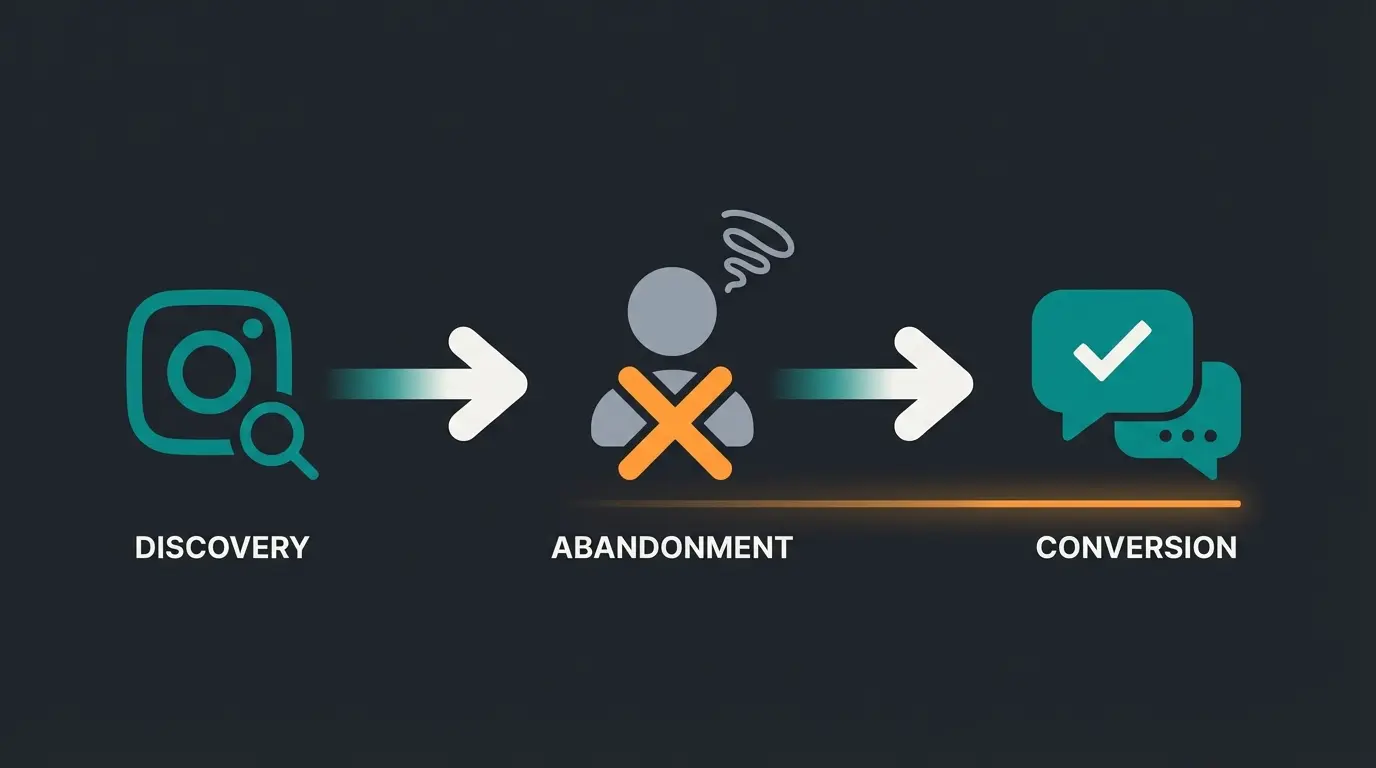
Let's analyze the customer journey of a typical Instagram user:
- Discovery: User sees an outfit from an influencer on Instagram
- Click: User clicks on the product tag
- Landing: User lands on the Shopware product detail page
- Friction: The image on Instagram was emotional, perfectly lit, on a model. The shop page is sober, showing the product cropped (packshot)
- The Question: "Will size M fit me if I always wear L from Brand X?" or "What shoes is the model wearing with the Instagram outfit?"
- The Abandonment: Since no answer is provided, the user leaves the shop
This is where 90% of current Shopware Instagram strategies fail. They redirect traffic but don't pick up the customer emotionally or advisorily. For businesses looking to solve this problem, implementing AI-powered product consultation can bridge this gap effectively.
Expected market penetration rate by 2025
Instagram strategies that don't convert due to lack of consultation
Conversion rate with AI-enhanced product consultation
Typical conversion rate without interactive guidance
The Future: AI Product Consultation as Your Unique Advantage
Here lies your opportunity to overtake the competition. Instead of just displaying images, use Artificial Intelligence to close the consultation gap. We're moving from "Passive Web 2.0" (displaying) to "Active Agentic Commerce" (consulting). As our research on AI product consultation shows, this shift is transforming e-commerce.
The Concept: From FAQ Bot to Style Advisor
Shopware has already introduced powerful backend tools with the AI Copilot (review summaries, content creation, export assistants), as documented at Shopware and analyzed by Shop-Studio. But the real lever for social commerce lies in the frontend: Guided Selling.
Scenario: The AI-Powered Social Commerce Journey
Imagine the following integration, made possible through plugins like "Guided Selling" or "AI Product Advisor" available in the Shopware Store:
- The Entry: The customer arrives at the shop via Instagram
- The Recognition: The shop recognizes via referrer (Instagram) that the user is visually inspired
- The Interaction: Instead of a static description, a subtle AI chat or quiz layer opens
The AI might say: "Love that look? I see you're looking at the summer blazer. Shall I help you find the right size based on your previous returns history?" Or: "By the way, the model on Instagram is wearing beige chinos with this. Shall I add them to your cart in your size?"
This approach to AI-powered product consultation transforms passive browsing into active engagement.
Why This Works: Psychology and Data
- Context Understanding: Modern AI plugins for Shopware can match product attributes (color, material, fit) with customer questions
- Reduction of Cognitive Load: The customer doesn't have to search ("Where are the pants from the picture?"), the AI serves them
- Conversion Boost: Studies by Qualimero show that Guided Selling can significantly increase conversion rates (up to 12.3% vs. 3.1% without interaction)
Comparison: Standard Plugins vs. AI-Enhanced Commerce
To make the right investment decision for your 2025 budget, this matrix helps. It compares the status quo with the new avant-garde of Shopware extensions. Understanding these differences is essential for leveraging AI for pre-sales success.
| Feature | Native Shopware 6 (Social Shopping) | Standard Instagram Feed Plugin | AI-Enhanced Solution (Guided Selling) |
|---|---|---|---|
| Main Purpose | Export to Meta (Catalog) | Import into Shop (Visual) | Consultation & Closing |
| Product Sync | Yes (XML/CSV Feed) | No (Images Only) | Yes (Context Understanding) |
| User Interaction | Passive (Click on Tag) | Passive (Click on Image) | Active (Dialog/Quiz) |
| GDPR Status | Uncritical (Backend) | Critical (Caching Required!) | Uncritical (First Party Data) |
| Conversion Lever | Traffic Generation | Trust (Social Proof) | Cart Increase & Cross-Selling |
| Example Tools | Shopware Core | Instagram Elements | Guided Selling / AI Copilot |
Stop losing customers after the click. Our AI-powered product consultation turns passive browsers into confident buyers by providing real-time, personalized guidance.
Start Your Free TrialPractical Tips for Your Content Strategy 2025
Technology is important, but content is the fuel. Based on current trends in the German market analyzed by Suxeedo and AP-Verlag, here are three concrete tips for your feed:
1. Authenticity Beats High Gloss
The trend is moving away from over-polished studio shots toward "raw content." Use UGC (User Generated Content) from your customers. A plugin that displays customer photos on the product page (with their permission) is more effective than any manufacturer photo. This approach, combined with AI-powered product consultation, creates powerful trust signals.
2. Video First (Reels Integration)
Static images are losing reach. When choosing your Shopware plugin, make sure it can also play Reels and videos in the feed. Moving images keep users on the page longer (Time on Site), which in turn is a positive SEO signal. The AI consultation builds trust while video content captures attention.
3. The Shop the Look Logic
Use the "Hotspot" function of many plugins. An image should never lead to just one product. Link jacket, pants, and shoes in the same image. Combine this with a cross-selling slider under the Instagram widget. This strategy is further enhanced when AI consultation boosts mobile conversions.
Advanced Integration: Maximizing ROI with AI Consultants
Beyond basic setup, the real competitive advantage comes from how AI-powered sales consultants interact with your Instagram traffic. These systems analyze customer behavior patterns and provide personalized recommendations in real-time.
When a customer arrives from Instagram, the AI can immediately recognize the context—which post they clicked, what aesthetic they're drawn to, and what products complement their interest. This level of personalization was previously only possible in physical retail, where skilled salespeople could read customer preferences and guide them accordingly.
Studies show that AI consultants boost cart values significantly by suggesting relevant add-ons and addressing sizing concerns before they lead to abandonment. The key is implementing these tools in a way that feels helpful rather than intrusive.
Implementation Best Practices for German E-Commerce
The German market has specific requirements that go beyond GDPR compliance. German consumers value transparency, quality, and detailed product information. When implementing AI product consultants, consider these cultural factors:
- Trust Indicators: Display "Made in Germany" badges and certifications prominently
- Detailed Specifications: German customers expect thorough product descriptions
- Clear Pricing: Include all costs upfront, including shipping and taxes
- Return Policy Visibility: Make your return process clear and customer-friendly
- Data Privacy Communication: Explicitly communicate how customer data is used
For a real-world example of successful implementation, see how AI Employee Kira transformed customer engagement for a German garden supplies retailer.
Frequently Asked Questions
The native export function (Outbound/Social Shopping) is GDPR-compliant as it only transfers product data to Meta. However, for Inbound integration (displaying Instagram feeds on your store), you must use plugins with server-side image caching to avoid transferring visitor IP addresses to US servers. Always verify your plugin choice includes local caching capabilities.
Social Shopping (native in Shopware 6) exports your products to Meta's catalog, making them taggable in Instagram posts. Instagram Feed plugins do the opposite—they import your Instagram content into your Shopware storefront for social proof. For maximum effectiveness, you need both: Outbound for reach and Inbound for trust-building.
AI consultation bridges the gap between visual inspiration and purchase decision. When customers click from Instagram, they're often emotionally engaged but lack practical information (sizing, matching items, availability). AI consultants provide instant, personalized answers—similar to an in-store sales associate—which can boost conversion rates from 3.1% to 12.3% according to industry studies.
For GDPR compliance, look for plugins offering local image caching such as "Instagram Elements" by Studio Solid or "Instagram Feed Ultimate" by Acris/Proxation. Key features to verify: server-side caching, two-click consent options, and hotspot tagging for shoppable galleries. Always check the plugin's data processing documentation before installation.
Set your update interval based on inventory volatility. For fast-moving products or flash sales, use hourly syncs. For stable inventory, daily updates suffice. More frequent syncs prevent customers from clicking on out-of-stock items, which damages both user experience and your Instagram Shopping performance metrics.
Conclusion: Connecting the Dots for Success
Shopware Instagram Shopping in 2025 is more than just a technical setup. It's an ecosystem built on three pillars:
- The Foundation: A clean, native export via Shopware Sales Channels to Meta
- The Trust: A GDPR-compliant, locally cached feed on your homepage that delivers social proof
- The Close: An AI-powered instance (Guided Selling) that captures visual traffic and guides customers to purchase like a skilled salesperson
Most of your competitors will stop at step two. You now have the roadmap to take the crucial third step. The brands that succeed in 2025 will be those that recognize Instagram isn't just a traffic source—it's the beginning of a conversation that AI can continue.
Review your GDPR settings in your current Instagram plugin today and explore "Guided Selling" solutions in the Shopware Store. Transform your visitors from spectators into buyers.
Join leading Shopware merchants who've transformed their Instagram traffic into consistent sales with AI-powered product consultation. Start your free trial today.
Get Started Now